

Comparison

Best habit tracker apps for PC

Eight habit trackers for Windows, side by side.

On this page
  1. Picks at a glance
  2. Scores
  3. Our app: Dabadoro
  4. Dedicated habit trackers
    1. Habitify
    2. OpenHabitTracker
    3. Habit Trekker
    4. Table Habit
  5. Planners with habits
    1. TickTick
    2. Super Productivity
    3. Lunatask
  6. How we scored
  7. No tracker on Windows
  8. Summary
  9. Questions

Picks at a glance

Start from what you want beside your habits.

Scores

Six things that matter on a PC, each out of 5 stars. A trophy marks the best in each column.

  • 3 of 5 stars: filled stars are the score
  • Best in this column. Ties are all marked
  • * Partly not stated by the maker
Eight habit trackers for PC compared on six things, each scored from 0 to 5 stars. Dabadoro, the app we make, is the first row.
AppOn WindowsPomodoro timerHabit trackingSchedule and viewsFloating timerRewards
DabadoroFreeOur appTotal: 30 of 30 stars, best in this column3.9 MB installer, best in this column5 of 5, best in this column6 of 6, best in this column4 of 4, best in this columnOn top, pause, best in this columnCoins buy rewards
Dedicated habit trackers
HabitifyFree for 3 habitsTotal: 16 of 30 starsStore, 150 MBCountdown on PC5 of 61 of 4Inside the appChallenge points
OpenHabitTrackerFreeTotal: 11 of 30 stars72 MB installerCount-up timer4 of 6Lists onlyInside the appNo rewards
Habit TrekkerFreeTotal: 9 of 30 starsUniversal appNo timer3 of 6No scheduleNo timerOwn badge rewards
Table HabitFreeTotal: 8 of 30 stars24 MB MSIXNo timer3 of 61 of 4No timerDone picture
Planners with habits
TickTickFree for 5 habitsTotal: 23 of 30 stars24 MB installerNo growing sessions5 of 6, best in this column4 of 4Mini windowPoints, 12 levels
Super ProductivityFreeTotal: 18 of 30 stars261 MB installerNo growing sessions4 of 63 of 4Widget, no pauseConfetti
LunataskFree for 7 habitsTotal: 14 of 30 stars205 MB installerTask timer3 of 6, best in this column4 of 4Main windowNo rewards

Stars follow the rules in How we scored. Facts about the other apps come from each maker's own site, store page or code, read on 31 October 2026 and checked again on 2 November 2026; Dabadoro's come from its own release.

Our app: Dabadoro

The app we make, with every fact from our own release.

Dabadoro

By Kosmorph

Our app

Best forHabits and tasks on an hourly day plan, with focus sessions that grow longer, one habit on several schedules, coins for rewards you set and a 3.9 MB installer.

Windows
  • Installer (.exe)
  • .msi
Mac
  • DMG, Apple Silicon and Intel
Linux
  • AppImage
  • .deb
  • .rpm
Price
  • Free, no habit limit
  • On Windows, best in this column
  • Pomodoro timer, best in this column
  • Habit tracking, best in this column
  • Schedule and views, best in this column
  • Floating timer, best in this column
  • Rewards, best in this column
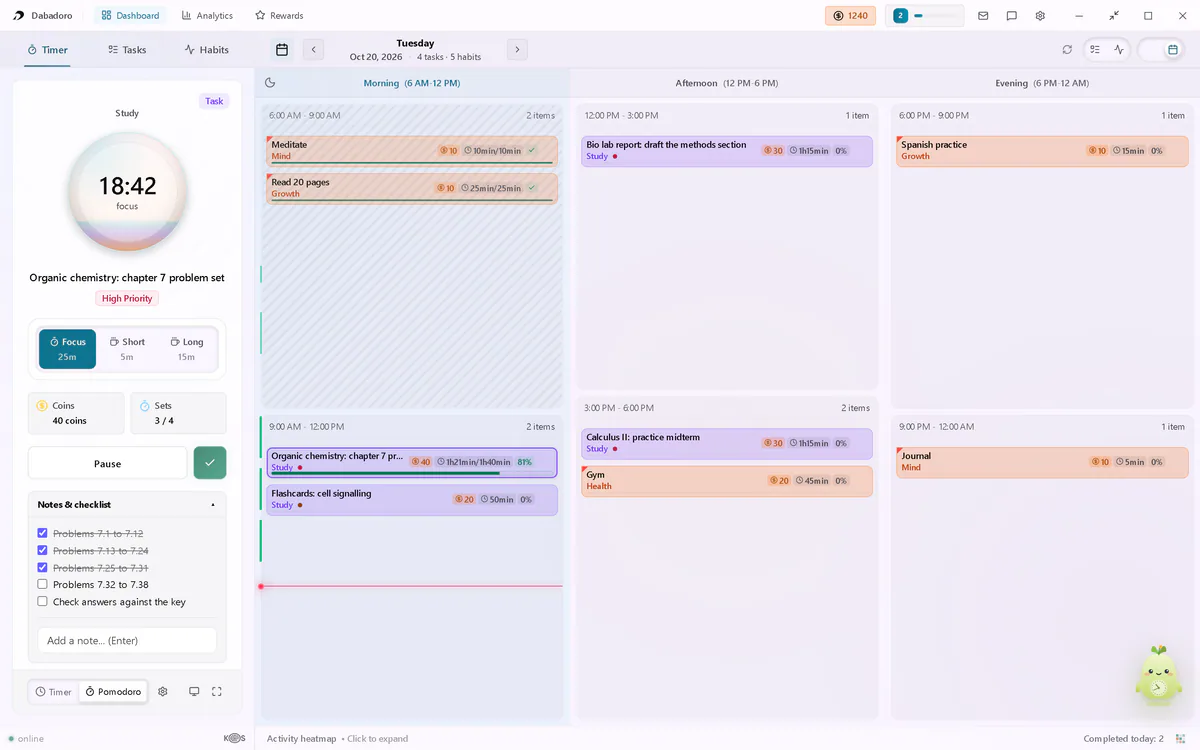
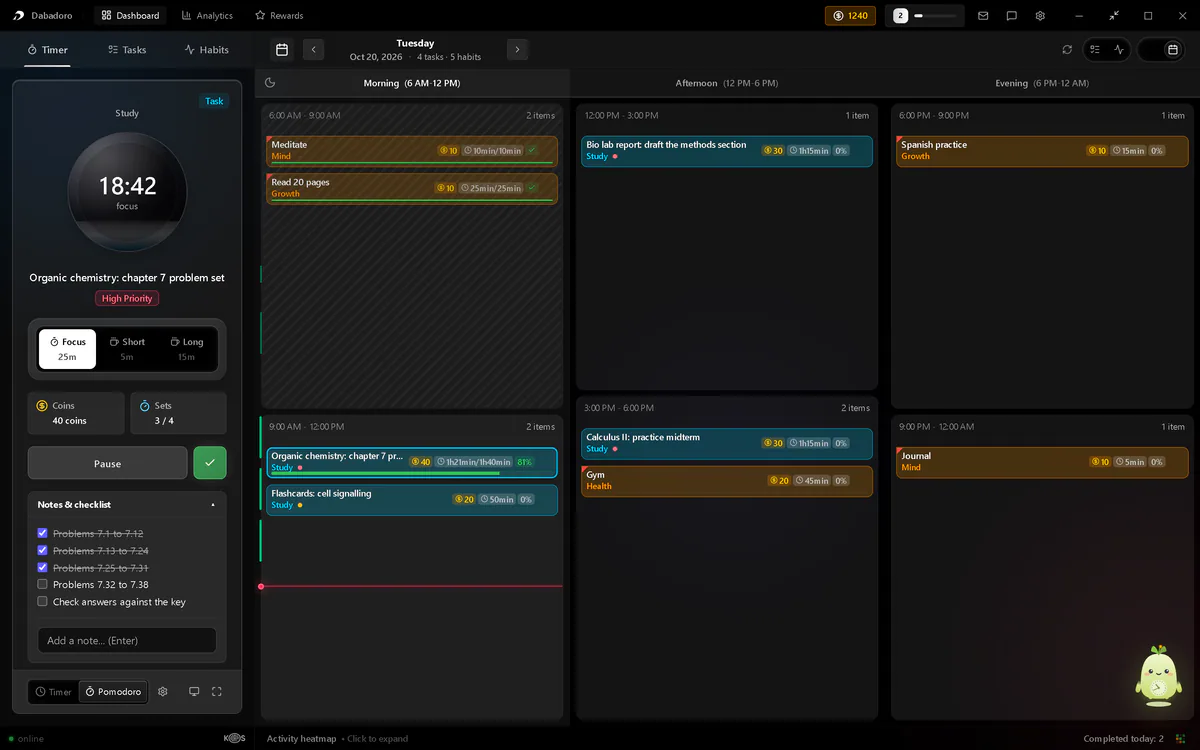
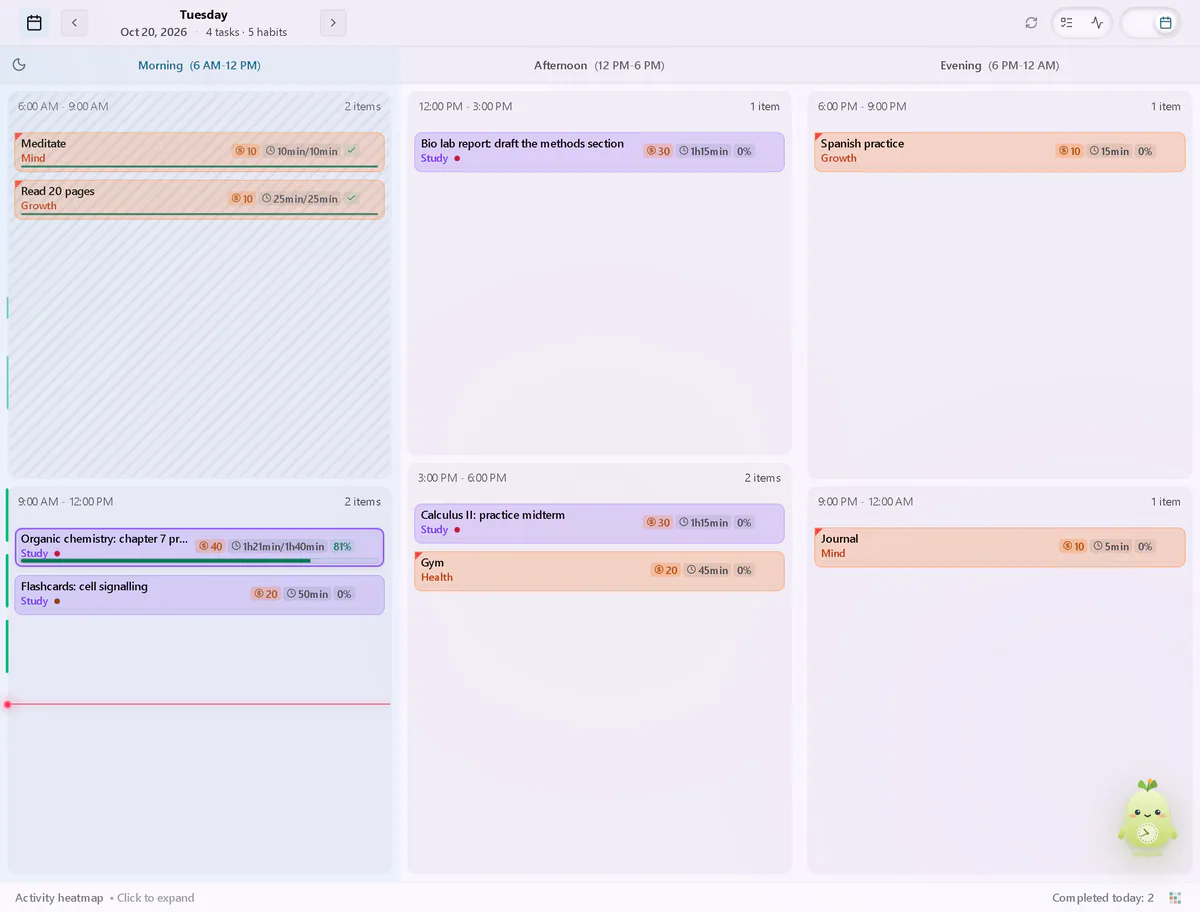
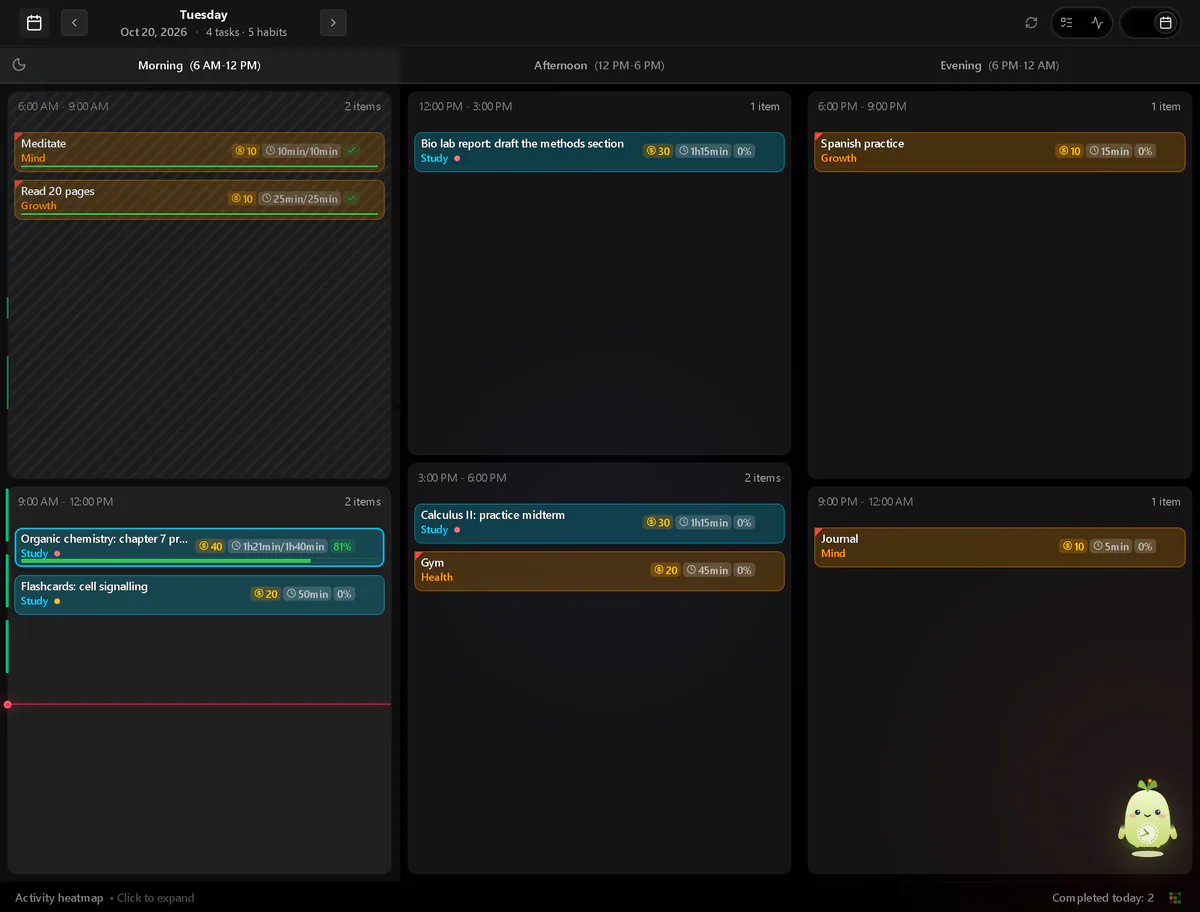
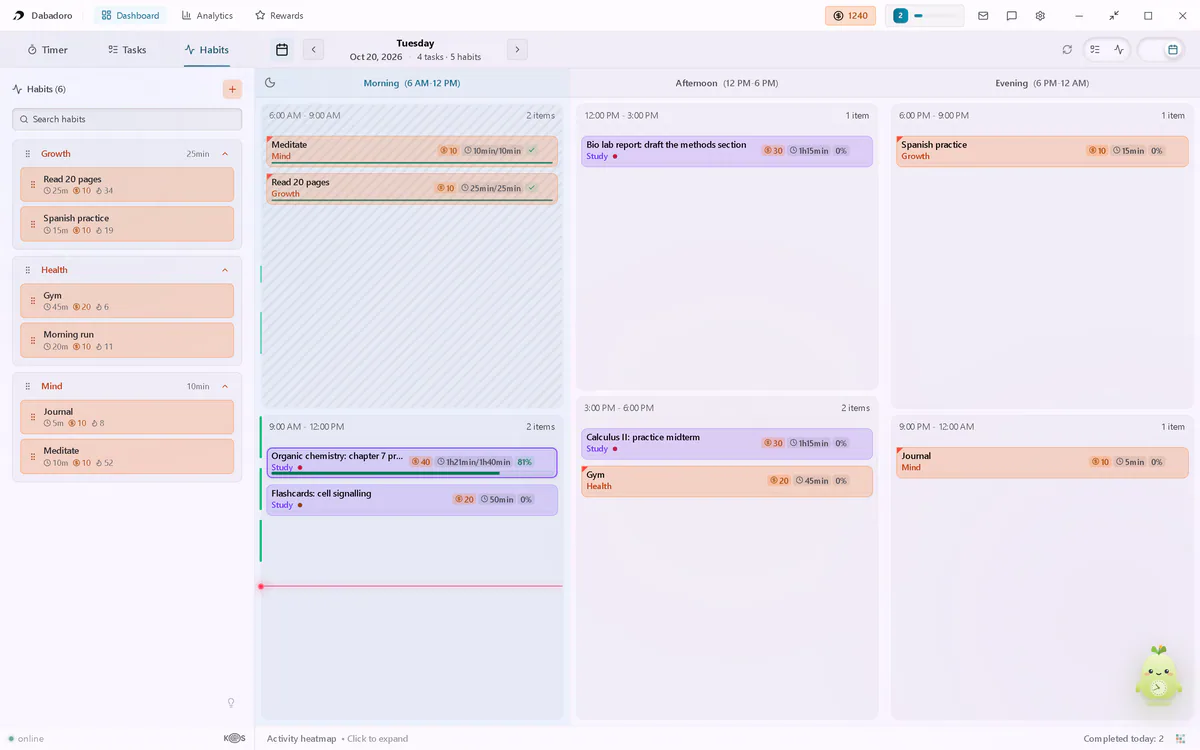
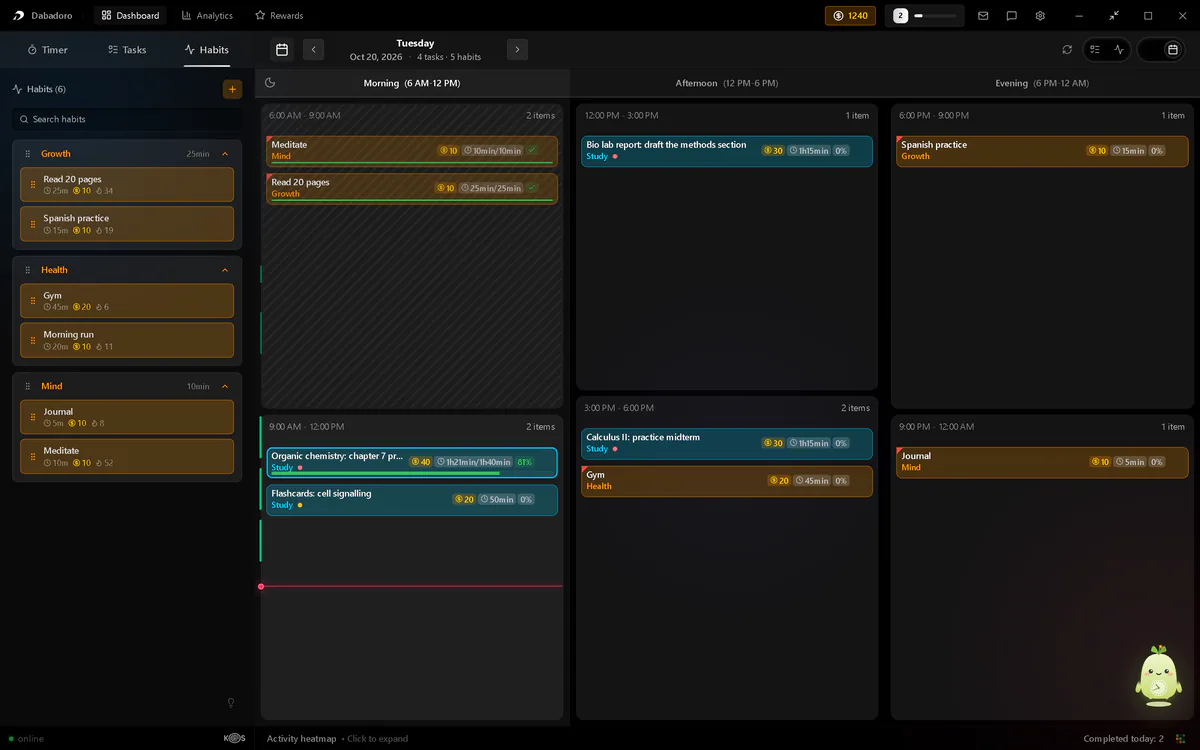
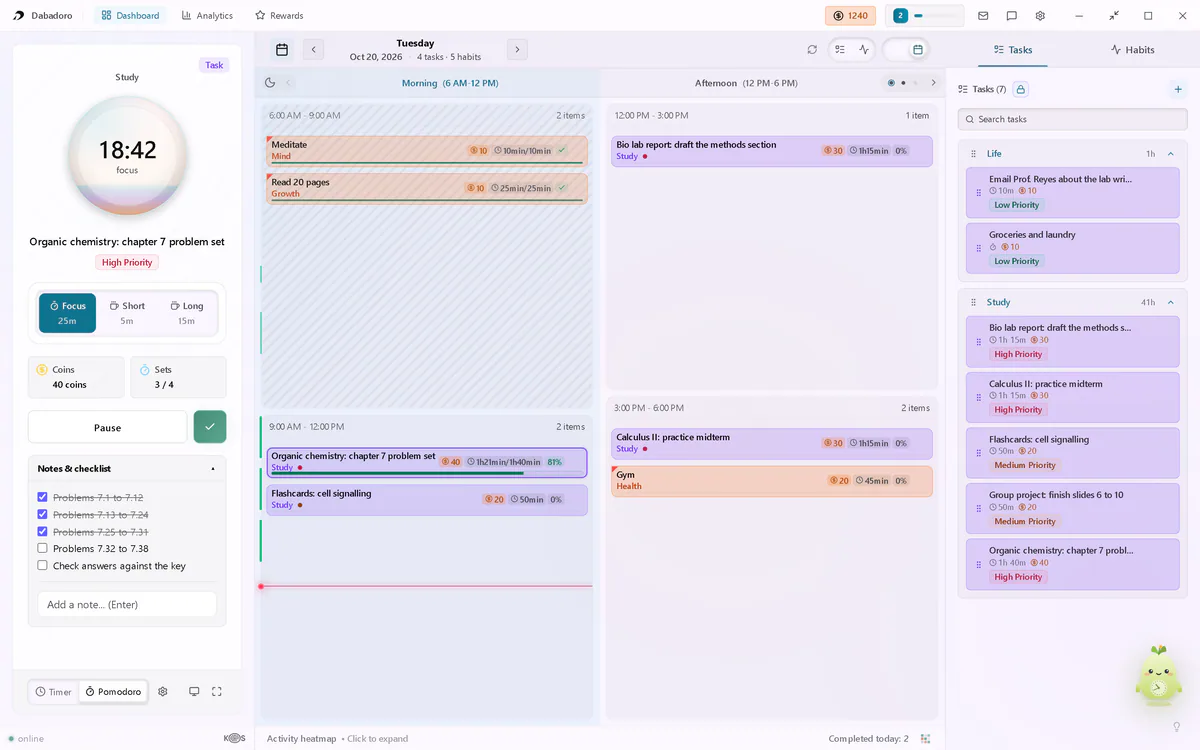
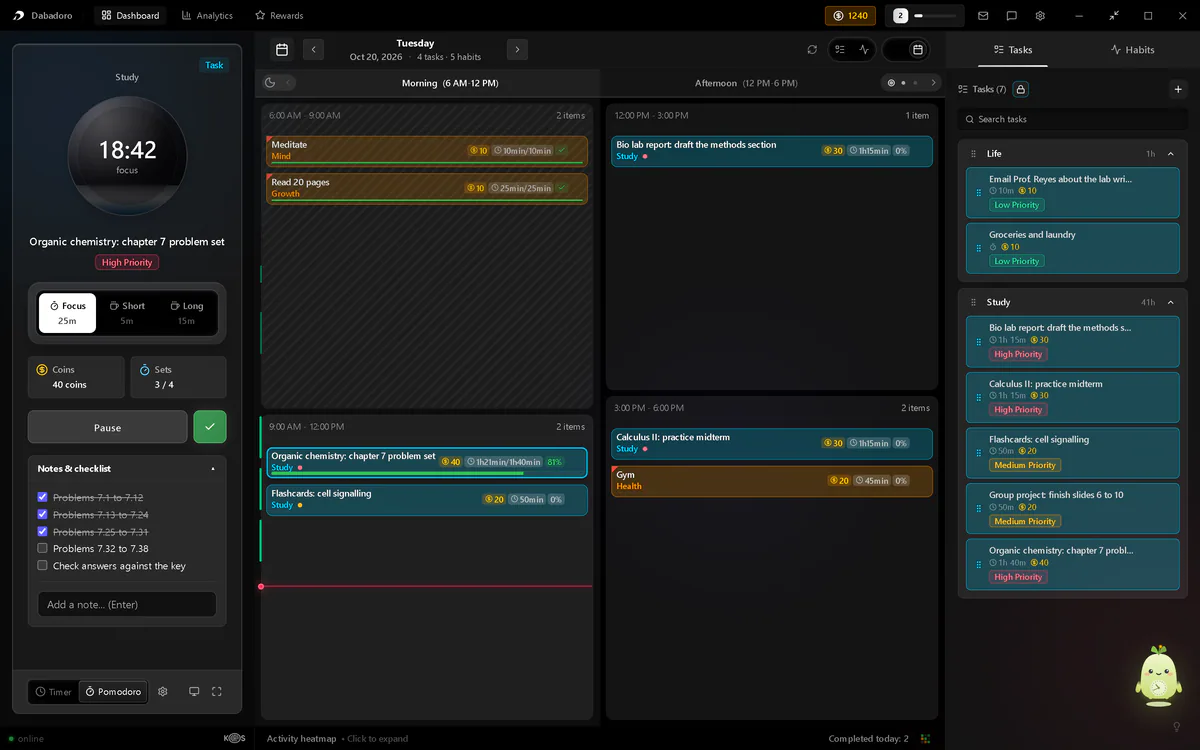
Dabadoro dashboard: a Pomodoro focus timer running beside the day planned in Morning, Afternoon and Evening columns (Light)Dabadoro dashboard: a Pomodoro focus timer running beside the day planned in Morning, Afternoon and Evening columns (Dark)
Dabadoro's dashboard: a Pomodoro timer beside the day planned in Morning, Afternoon and Evening columns.
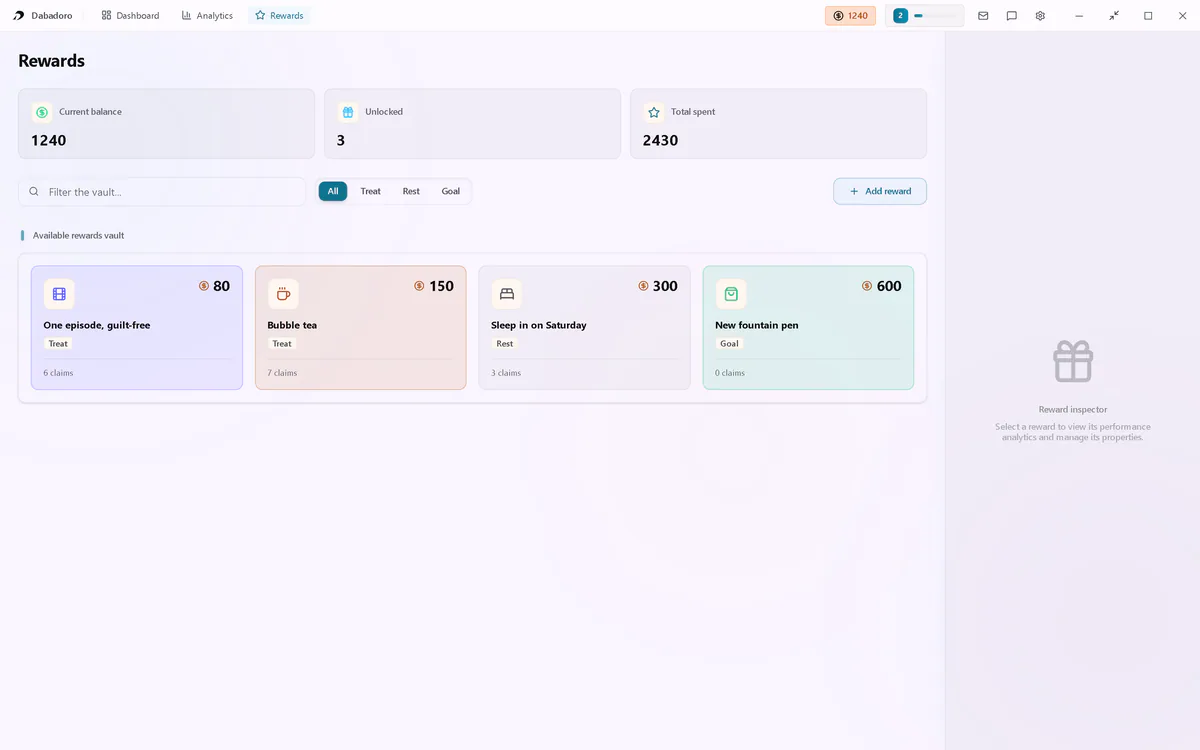
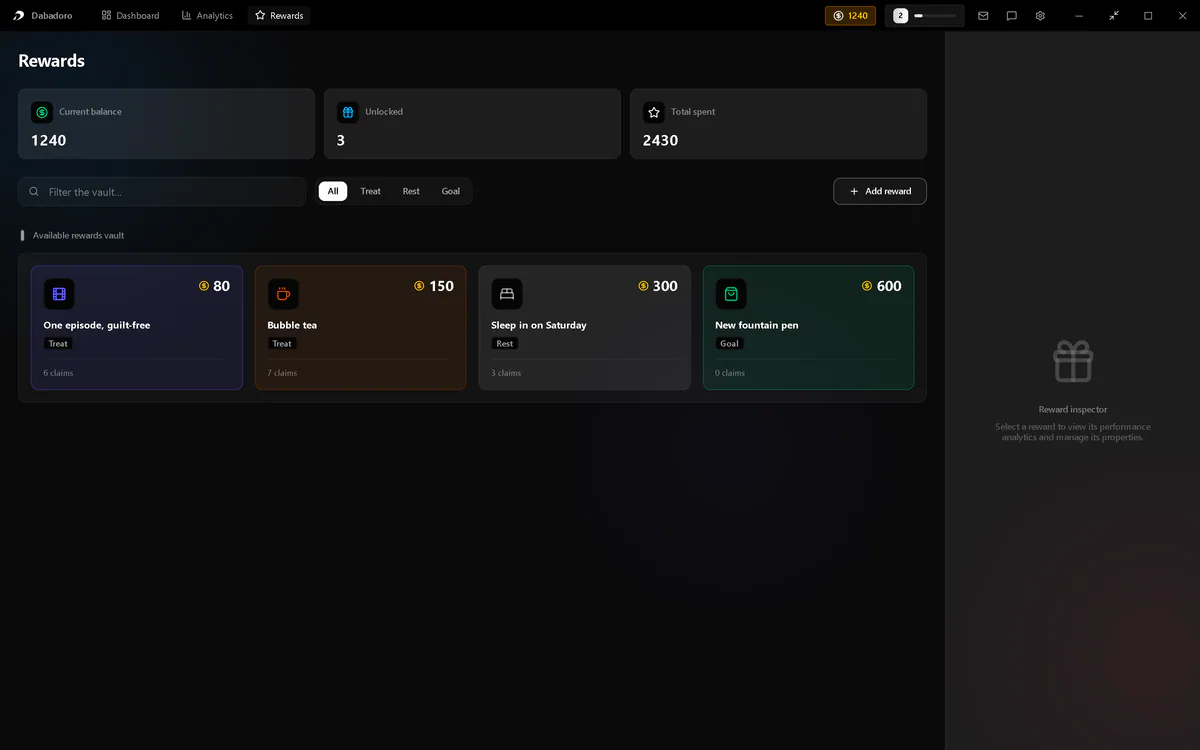
  • Dabadoro rewards vault: the coin balance and four rewards set by the user, each with its coin price (Light theme)Dabadoro rewards vault: the coin balance and four rewards set by the user, each with its coin price (Dark theme)

    Rewards you set, paid in coins

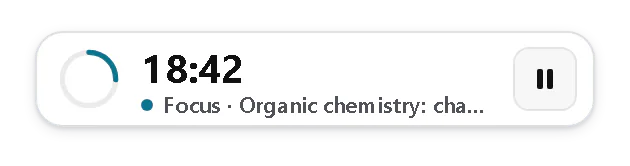
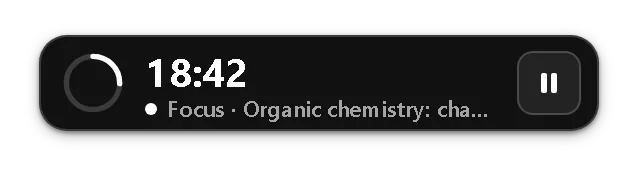
  • Dabadoro floating timer in the Standard style: countdown ring, time left and the current task (Light theme)Dabadoro floating timer in the Standard style: countdown ring, time left and the current task (Dark theme)

    Floating timer

  • Dabadoro schedule in Period columns view: Morning, Afternoon and Evening blocks of tasks and habits (Light theme)Dabadoro schedule in Period columns view: Morning, Afternoon and Evening blocks of tasks and habits (Dark theme)

    Schedule views

  • Dabadoro Habits tab: six habits grouped by topic, each with its current streak (Light theme)Dabadoro Habits tab: six habits grouped by topic, each with its current streak (Dark theme)

    Habits and streaks

DetailsWhat it does well, what to know and why these stars

Does well

  • Focus sessions grow longer, up to a limit you set
  • One habit on several schedules, each with its own days and time
  • A 3.9 MB installer for Windows
  • Floating timer stays on top of other apps
  • Habits sit in hours beside your tasks
  • Coins buy rewards you set yourself
  • No habit limit on the free plan; rest days never break streaks

Good to know

  • The floating timer and growing focus sessions (in beta) are Pro, open to everyone until paid plans go on sale.
  • Needs a free account; the free plan shows occasional promotions.
Pick it if

you want your habits in the hours of your day, next to your tasks, a floating timer and rewards you set.

Skip it if

you only want a bare habit checklist, without a day plan or a timer.

Why these stars

On Windows
, best in this column
A 3.9 MB .exe or 5.4 MB .msi from dabadoro.com and GitHub, using the web view built into Windows 10 and 11.
Pomodoro timer
, best in this column
All five: timed tasks and habits finish on their own; growing sessions are Pro, in beta, open to everyone until paid plans go on sale.
Habit tracking
, best in this column
A streak per habit, chosen weekdays, every few days, one habit on several schedules, the last 7 days marked done, and statistics per habit.
Schedule and views
, best in this column
An hourly grid with habits at their set time, tasks you drag into an hour, and three schedule views plus a week strip.
Floating timer
, best in this column
Its own small window stays on top of other apps, with Pause and Resume. Pro, open to everyone until paid plans go on sale.
Rewards
, best in this column
Tasks and habits pay coins you spend on rewards you write yourself in the Rewards vault.

Get Dabadoro for WindowsFacts from our own release
Dedicated habit trackers

Apps built for habits first, with little or nothing else.

Habitify

By Unstatic Co., Ltd

Tracker

Best forA polished dedicated habit tracker with flexible repeats and trend charts, on Windows and Mac.

Windows
  • Microsoft Store only
Mac
  • Mac App Store
Linux
  • No Linux app
Price
  • Free for 3 habits
  • Plus and Pro plans
  • On Windows
  • Pomodoro timer
  • Habit tracking
  • Schedule and views
  • Floating timer
  • Rewards
Habitify at a glance: its stars in each of the six columns.
DetailsWhat it does well, what it lacks and why these stars

Does well

  • Weekdays, monthly dates or every N days
  • Log or fix any past day
  • Detailed streak history and trend charts

Lacks

  • Only 3 habits on the free plan
  • No hourly schedule; to-dos live inside a habit
  • Its PC help shows a countdown, not Pomodoro
Pick it if

you want a polished dedicated tracker and do not mind a subscription.

Skip it if

you use Linux, or you need more than 3 habits for free.

Why these stars

On Windows
An installed desktop app from the Microsoft Store only, about a 150 MB download. Its download page offers no installer.
Pomodoro timer
A free PC countdown runs from a habit, logs itself, and meeting the habit's time goal completes the day. Desktop help never mentions Pomodoro.
Habit tracking
Streaks, chosen weekdays, every N days, any past day logged and trend charts. Each habit has one repeat rule.
Schedule and views
A list of one day and a grid of several days. Habits sit in morning, afternoon and evening blocks, not hours.
Floating timer
The desktop timer opens a timer screen inside the app. Nothing says it floats; the Windows tray mini screen is described as a habit list.
Rewards
Completing a challenge day earns 100 points, with a leaderboard and gold, silver or bronze medals, but only inside challenges with other people.

habitify.meChecked 2 November 2026

OpenHabitTracker

By Jinjinov

Tracker

Best forHabits that repeat on an interval, in a free and open-source app.

Windows
  • Installer
  • winget
  • Microsoft Store
Mac
  • Mac App Store
  • .pkg
Linux
  • Flathub
  • Snap
  • .zip
Price
  • Free, no purchases
  • On Windows
  • Pomodoro timer
  • Habit tracking
  • Schedule and views
  • Floating timer
  • Rewards
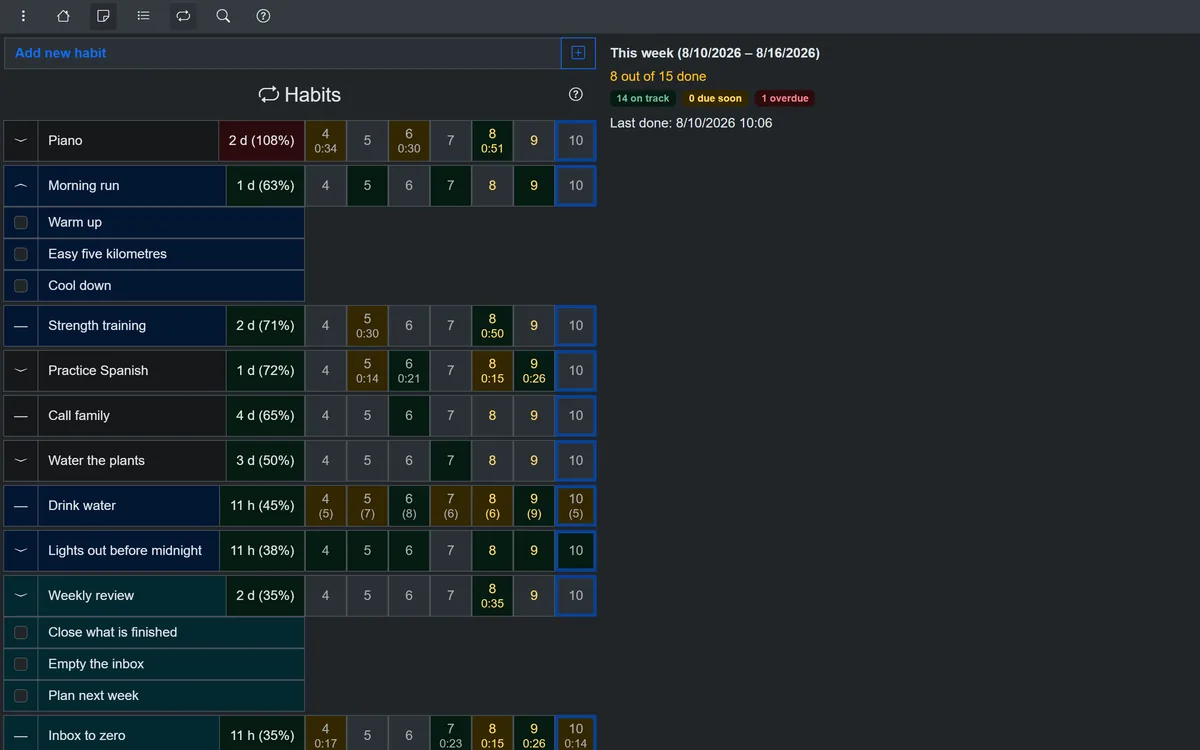
OpenHabitTracker on a desktop computer: a list of habits with the last days marked beside each one
OpenHabitTracker's habit list on the desktop. From its repository (GPL-3.0).
DetailsWhat it does well, what it lacks and why these stars

Does well

  • Free and open source, with no purchases
  • Repeat every N days, weeks or months
  • Charts, streaks and notes per habit

Lacks

  • No habits on chosen weekdays
  • No day schedule or Pomodoro
  • No rewards or badges
Pick it if

you want a free, private tracker for habits like watering plants every 3 days.

Skip it if

you plan habits on chosen weekdays, such as Monday and Thursday.

Why these stars

On Windows
A 72 MB installer from its own site, or winget and the Microsoft Store.
Pomodoro timer
Each habit and task has a timer that stops at its own Duration and marks it done, but it has no breaks or Pomodoro cycles.
Habit tracking
Streaks, every N days, missed days filled in and charts per habit. No chosen weekdays, and one repeat rule per habit.
Schedule and views
Tasks have a date and time but sit in filtered lists. There is no day or week schedule.
Floating timer
The timer, with pause and stop buttons, sits in the habit or task panel of the main window and never floats over other apps.
Rewards
No points, badges, levels, rewards or celebrations appear on its site or in its code.

openhabittracker.netChecked 2 November 2026

Habit Trekker

By Chris Boen

Tracker

Best forA simple, free tracker for one Windows PC, with streaks, levels and badges.

Windows
  • Microsoft Store only
Mac
  • No Mac app
Linux
  • No Linux app
Price
  • Free, nothing to buy
  • On Windows
  • Pomodoro timer
  • Habit tracking
  • Schedule and views
  • Floating timer
  • Rewards
Habit Trekker at a glance: its stars in each of the six columns.
DetailsWhat it does well, what it lacks and why these stars

Does well

  • Free with no habit limit or ads
  • Edit past days on a calendar
  • Badges, levels and your own badge rewards

Lacks

  • Windows only, with no sync
  • No timer or day schedule
  • Schedule options and reminders not described
Pick it if

you use one Windows PC and want something simple that costs nothing.

Skip it if

you want your habits on a Mac or a Linux computer too.

Why these stars

On Windows
A sandboxed Universal Windows app from the Microsoft Store only, about a 28 MB download.
Pomodoro timer
Its Store description, feature list, release notes and screenshots show no timer of any kind, so none of the five Pomodoro items can be counted.
Habit tracking
A current and best streak, past days edited on a calendar and habit stats. Weekdays, intervals and several schedules are not described.
Schedule and views
A habit dashboard and detail tabs, with no day or week schedule.
Floating timer
No timer appears in its Store description, release notes, screenshots or blog, so there is nothing to show while you work elsewhere.
Rewards
You write your own reward for each habit, earned with its next badge, and levels rise with total progress. There are no points to spend.

Microsoft Store listingChecked 2 November 2026

Table Habit

By FriesI23

Tracker

Best forSmall daily habits scored over time, with optional sync through your own WebDAV server.

Windows
  • MSIX
  • Scoop
  • Microsoft Store
Mac
  • Mac App Store
  • Homebrew
  • DMG
Linux
  • Flathub
  • .flatpak
Price
  • Free, no purchases
  • On Windows
  • Pomodoro timer
  • Habit tracking
  • Schedule and views
  • Floating timer
  • Rewards
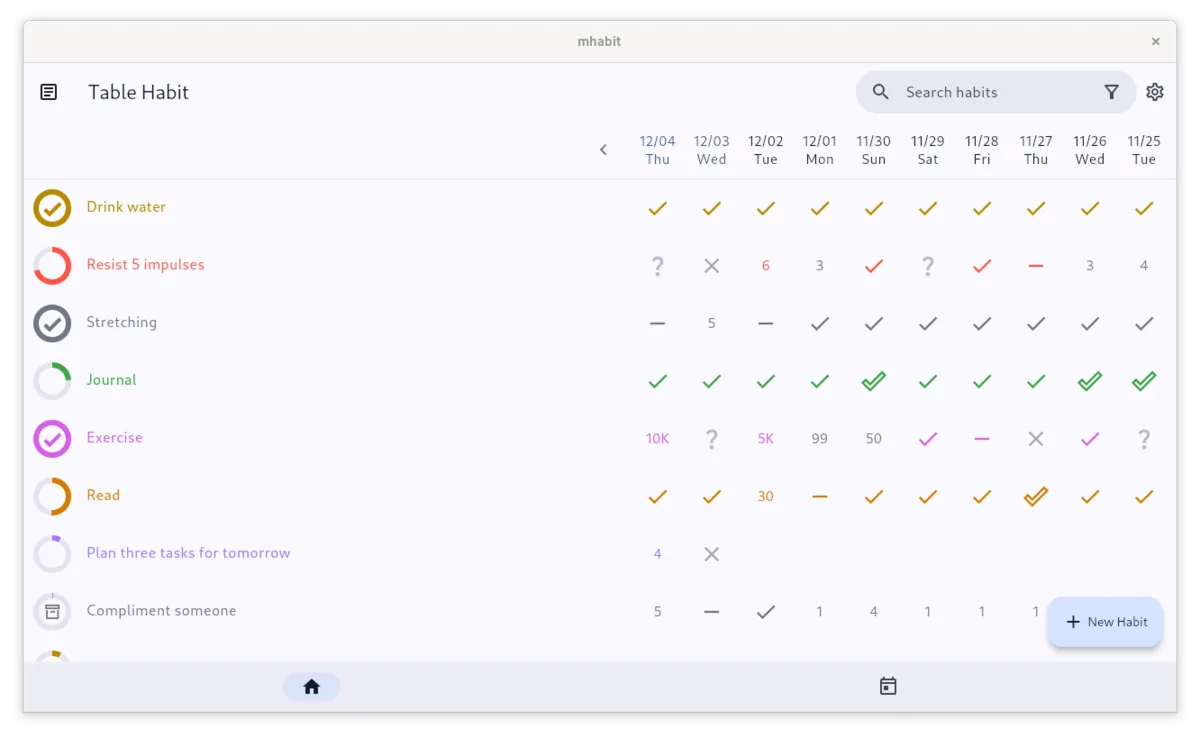
Table Habit on a desktop computer: habits in rows and the last ten days in columns, with checks, counts and crosses
Table Habit's home table on Linux. From its Flathub listing (Apache-2.0).
DetailsWhat it does well, what it lacks and why these stars

Does well

  • Free and open source, with no ads
  • Heatmap and score charts per habit
  • Habit categories and optional WebDAV sync

Lacks

  • No streak count, a score instead
  • No fixed weekdays for habits
  • No timer, tasks or schedule
Pick it if

you want a light, free tracker that rewards consistency over days in a row.

Skip it if

streak counts are what keep you going.

Why these stars

On Windows
A 24 MB MSIX from GitHub or Scoop, or the Microsoft Store.
Pomodoro timer
Its README, Flathub listing and code have no focus timer, so none of the five Pomodoro items are there.
Habit tracking
Every N days, past days edited, and heatmap and score charts. No streak count, no fixed weekdays, and its groups are categories.
Schedule and views
A Today page in card or grid layout and a table of recent days. No hourly schedule and no tasks.
Floating timer
It has no timer at all, so there is nothing to float over other apps.
Rewards
A YOU MADE IT picture appears once today's habits are done. Each habit's 0 to 100 score tracks consistency and drops when you miss.

github.com/FriesI23/mhabitChecked 2 November 2026

Planners with habits

To-do apps and day planners with a habit tracker inside.

TickTick

By Appest Inc.

Planner

Best forHabits inside a full to-do list and calendar, on Windows, Mac and Linux.

Windows
  • Installer: 64-bit, ARM64, 32-bit
Mac
  • DMG
Linux
  • deb
  • rpm
  • AppImage
  • Snap
Price
  • Free for 5 habits
  • Premium plan
  • On Windows
  • Pomodoro timer
  • Habit tracking
  • Schedule and views, best in this column
  • Floating timer
  • Rewards
TickTick at a glance: its stars in each of the six columns.
DetailsWhat it does well, what it lacks and why these stars

Does well

  • Streaks, intervals and a yearly heat map
  • Focus mini window on Windows
  • Habits appear on the calendar timeline

Lacks

  • Only 5 habits on the free plan
  • Full calendar views and durations cost extra
  • Habit sections are fixed times of day
  • Focus sessions do not grow longer on their own
Pick it if

you already plan your tasks in TickTick, or want one app for tasks and habits.

Skip it if

you need more than 5 habits and do not want to pay.

Why these stars

On Windows
Its own 24 MB installer for 64-bit Windows, with ARM64 and 32-bit builds, from its site.
Pomodoro timer
Cycles with a longer break, your lengths, and focus from a task or habit. No growing sessions; nothing says a timed item is marked done.
Habit tracking
Streaks, chosen weekdays, intervals, missed days logged from the calendar and statistics with a yearly heat map. One frequency per habit.
Schedule and views
, best in this column
A calendar timeline shows habits with a time and takes dragged tasks, beside week, month, list and Kanban views. Full views are Premium.
Floating timer
The Windows Focus Mini Window sits over other windows and has a start button, but no maker page shows pause or stop buttons.
Rewards
Adding and completing tasks earns achievement points across 12 levels, habit check-ins earn badges, and the rewards are set by TickTick, not by you.

ticktick.comChecked 2 November 2026

Super Productivity

By Johannes Millan

Planner

Best forA free, open-source task planner with a simple habit page and an always on top timer widget.

Windows
  • Installer
  • Portable
  • Microsoft Store
Mac
  • DMG
Linux
  • AppImage
  • deb
  • rpm
  • Snap
  • Flathub
Price
  • Free, every feature
  • On Windows
  • Pomodoro timer
  • Habit tracking
  • Schedule and views
  • Floating timer
  • Rewards
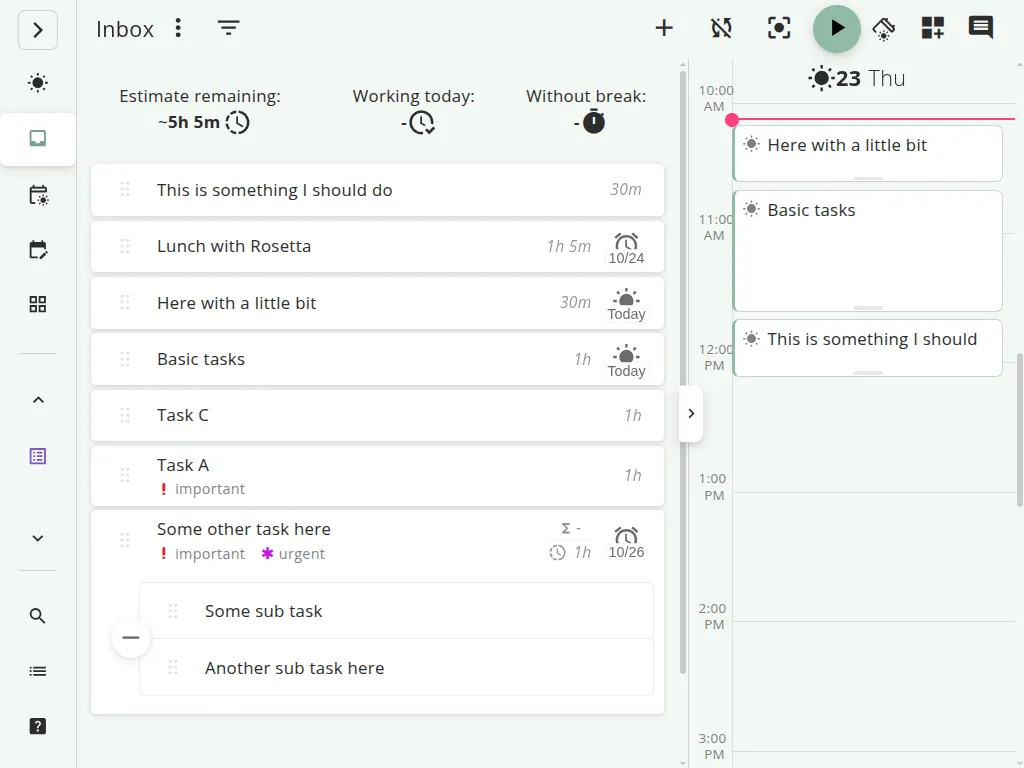
Super Productivity's schedule: the day's tasks laid out on a timeline beside the task list
Super Productivity's day planner. Screenshot from its press kit.
DetailsWhat it does well, what it lacks and why these stars

Does well

  • Every feature free, on every platform
  • Always on top timer widget on desktop
  • Day, week and month schedule timeline

Lacks

  • Habits cannot be placed in the schedule
  • No every N days habits
  • Timer widget is off by default
  • A 261 MB download on Windows
Pick it if

you want everything free and open source, and habits are a small part of your day.

Skip it if

you want your habits placed in your schedule.

Why these stars

On Windows
A 261 MB Setup.exe, a portable build or the Microsoft Store, for Windows 10 or later.
Pomodoro timer
Cycles with a longer break and lengths you set, started from a task. No growing sessions, and you finish a task by hand.
Habit tracking
An optional streak, chosen weekdays or a weekly count, past days in a weekly grid and a 28 day chart. No every N days.
Schedule and views
A day, week and month timeline you drag tasks onto, plus Today, Planner and Board views. Habits are not in the schedule.
Floating timer
An optional task widget stays on top of other apps with the current task and timer, but its only button opens the main window.
Rewards
Reaching a habit goal or finishing a focus session sets off confetti, but there are no points, levels or rewards.

super-productivity.comChecked 2 November 2026

Lunatask

By Lunatask, a team of two in Prague and Berlin

Planner

Best forTime blocking tasks and habits together on an hourly Today calendar.

Windows
  • Installer
  • Microsoft Store
Mac
  • Mac App Store
  • DMG
Linux
  • Snap
  • AppImage
Price
  • Free for 7 habits
  • Premium plan
  • On Windows
  • Pomodoro timer
  • Habit tracking
  • Schedule and views, best in this column
  • Floating timer
  • Rewards
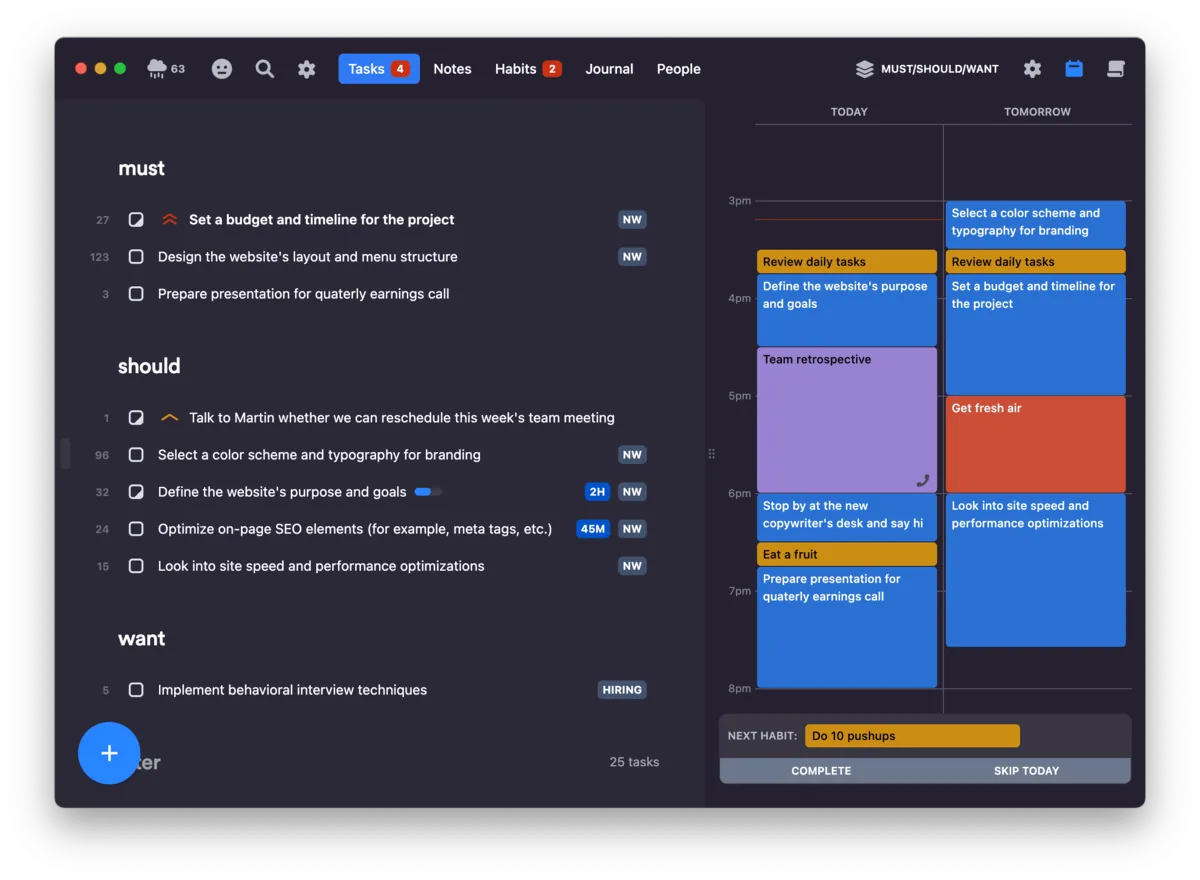
Lunatask on a Mac: a task list on the left and an hourly calendar for today and tomorrow on the right, with a next habit bar
Lunatask's task list beside its Today and Tomorrow calendar. From lunatask.app, whose press page offers screenshots.
DetailsWhat it does well, what it lacks and why these stars

Does well

  • Habits sit on the hourly Today calendar
  • Drag tasks straight into time blocks
  • Current and record streak per habit

Lacks

  • Free plan stops at seven habits
  • No week or month calendar view
  • No points, levels or rewards
Pick it if

you plan your day in time blocks and want habits inside those blocks.

Skip it if

you want more than 7 habits for free.

Why these stars

On Windows
A 205 MB installer for x64 and ARM from its download page, a 102 MB 64-bit one on GitHub, or the Microsoft Store.
Pomodoro timer
The timer always runs for one task, with a preset length picked each time. No breaks, cycles or per-task length are described.
Habit tracking
Current and record streaks, chosen weekdays and any day marked. One recurrence per habit; every N days and habit statistics are not shown.
Schedule and views
, best in this column
An hourly Today calendar takes habits at a set time and tasks dragged into blocks, plus a second list layout. No week view.
Floating timer
On Windows the task timer runs inside the main window; only the Mac app shows the remaining time in its status area.
Rewards
Its badges only count remaining items, no celebration is described, and points, levels and rewards are a roadmap idea under consideration.

lunatask.appChecked 2 November 2026

How we scored

Six things that matter for habits on a PC, each scored from 0 to 5 stars by written rules.

The Dabadoro team compared eight habit trackers that install on a Windows PC. Facts about the other apps come from their own sites, store listings and code, first read on 31 October 2026 and checked a second time; the Pomodoro timer, Floating timer, Rewards and download-size facts, and whether one habit can have several schedules, were researched on 2 November 2026. Dabadoro's facts come from its own code and release. The hands-on test on Windows is still to come.

  1. Every app here has a habit tracker and installs on a Windows PC. Apps that run only in a browser or on a phone are listed apart.
  2. Each app gets 0 to 5 stars in six columns, with the rules below: filled stars are its score, outlined stars the rest. The best score in each column gets a trophy, ties included.
  3. A feature counts only if the maker's own site, store listing or code says so. An asterisk marks a score the maker leaves partly unstated.
  4. Prices are shown, not scored. Dabadoro comes first because it is our app. The others are grouped by type, then ordered by their total stars out of 30.

What each score needs

On WindowsHow the app installs on a Windows PC, and how much it asks you to download.
A light installer under 20 MB, from outside the Microsoft Store.
Any other installed desktop app: an installer, winget, Scoop or the Microsoft Store.
A sandboxed Universal Windows app from the Microsoft Store.
A web app you install from the browser.
Works only in a browser tab.
No way to use it on Windows.
Pomodoro timerWhat the focus timer itself does: one star for each of five items, on any plan.
One star for:
Focus and break cycles, with a longer break after several sessions.
One star for:
You set the focus and break lengths.
One star for:
You start a focus session from a task or a habit.
One star for:
Focus sessions that grow a little longer each time, up to a limit you set.
One star for:
Each task or habit can have its own focus length, and it is marked done when that time is reached.
Habit trackingSix items: a streak count, chosen weekdays, every N days, one habit on several schedules (each with its own days and time), marking past days, and statistics for each habit.
All six items.
Five of the six items.
Four of the six items.
Three of the six items.
One or two of the six items.
Not one of the six items.
Schedule and viewsFour items: an hourly day schedule, habits at a set time in it, two or more views of the day or week, and tasks placed into time slots.
All four items: one star for each, and a fifth for having all four.
Three of the four items.
Two of the four items.
One of the four items.
Not one of the four items.
Floating timerWhere the focus timer shows while you work in other apps.
Its own small window that stays on top of other apps, with buttons to pause or stop the timer.
Its own small window that stays on top of other apps, without timer buttons.
A compact or tray timer that does not stay on top.
A timer only inside the app's main window.
A timer only in the app's phone or web version, not on the PC.
No timer.
RewardsWhat you earn for finishing habits and tasks.
Points or coins you spend on rewards you set yourself.
Rewards you write yourself, unlocked by levels or badges.
Points, XP or levels.
Badges or achievements.
Celebrations only, such as confetti.
Nothing.

Popular apps with no habit tracker on Windows

People often search for these on PC. This is where each one runs today.

  • Habitica
    • Web
    • iPhone
    • Android
    • No Windows app

    It runs in the browser and on iPhone and Android, with no official Windows app.

  • Loop Habit Tracker
    • Android
    • No Windows app

    An Android app, with no Windows version.

  • Streaks
    • iPhone, iPad, Mac
    • No Windows app

    An Apple app for iPhone, iPad and Mac, with no Windows version.

  • HabitKit
    • iPhone
    • Android
    • No Windows app

    A phone app for iPhone and Android, with no Windows version.

  • Way of Life
    • iPhone
    • Android
    • No Windows app

    A phone app for iPhone and Android, with no Windows version.

  • Microsoft To Do
    • Windows
    • No habits

    It runs on Windows, but has no habit tracker.

Summary

Dabadoro is our pick for habits on an hourly plan: a 3.9 MB installer, focus sessions that grow longer, one habit on several schedules, no habit limit on the free plan, a floating timer that stays on top and coins for rewards you set. Habitify is the most complete dedicated tracker, TickTick and Lunatask pair habits with tasks and a calendar, and Super Productivity, OpenHabitTracker and Table Habit are free and open source.

Updated Facts from each maker's site

Questions about habit trackers for PC

What is the best free habit tracker for Windows?

It depends on what you need. Dabadoro is free with no habit limit. Super Productivity, OpenHabitTracker and Table Habit are free and open source. Habit Trekker is free but Windows only. Habitify, TickTick and Lunatask limit the number of habits on their free plans.

Which habit tracker for PC has a Pomodoro timer?

Dabadoro, TickTick and Super Productivity have full Pomodoro cycles: focus and break lengths you set, a longer break after several sessions, and sessions started from a task; Dabadoro and TickTick also start one from a habit. Only Dabadoro, of the eight apps here, has focus sessions that grow a little longer each time, up to a limit you set (a Pro feature in beta, open to everyone until paid plans go on sale). Dabadoro and OpenHabitTracker mark a task or habit done when its own focus length is reached, and Habitify's PC countdown completes a habit's day once its time goal is met. OpenHabitTracker's timer has no breaks, and Lunatask has a task timer without breaks.

Which habit tracker for PC is the lightest download?

Dabadoro: its Windows installer is 3.9 MB and its .msi 5.4 MB, because it uses the web view built into Windows 10 and 11. Measured on 2 November 2026, TickTick's installer is 24 MB, Table Habit's MSIX 24 MB, Habit Trekker about 28 MB from the Microsoft Store, OpenHabitTracker's installer 72 MB, Lunatask's 205 MB from its download page (102 MB for 64-bit only on GitHub), Habitify about 150 MB from the Microsoft Store and Super Productivity's 261 MB.

Which habit tracker for PC has a floating timer?

Dabadoro's floating timer is its own small window that stays on top of other apps while a focus session runs. Super Productivity has an optional always on top task widget, and TickTick has a Focus Mini Window on Windows.

Can one habit run at different times on different days?

In Dabadoro, yes. Every habit starts in its Default group, and you can add more groups, each with its own time and days. None of the other seven makers describes one habit on several schedules.

Which habit tracker for PC lets me spend points on my own rewards?

Dabadoro pays the coins you set for each finished task and habit, and you spend them on rewards you create and price yourself. Habit Trekker lets you write a reward for each badge, and Habitify and TickTick give points with no rewards of your own.

Is there a Habitica desktop app?

No. Habitica runs in the web browser and on iPhone and Android, and there is no official Windows app.

Is Loop Habit Tracker available for Windows?

No. Loop Habit Tracker is an Android app. For a free, open-source tracker on Windows, look at OpenHabitTracker or Table Habit.

Does Windows have a built-in habit tracker?

No. Microsoft To Do runs on Windows but has no habit tracker. For habits with streaks on a PC, look at the apps compared above.

Dabadoro's own habit tracker is on the habit tracker page, with the streak rules and habit groups in the docs.

Share this article

About Dabadoro

Dabadoro puts tasks, habits and a focus timer on an hourly day plan, free on Windows, macOS and Linux. It is made at Kosmorph.

How Dabadoro's habit tracker works

Habit Trekker, Habitify, OpenHabitTracker, Table Habit, Lunatask, Super Productivity and TickTick are their makers' names and trademarks. App icons: Super Productivity from its press kit, OpenHabitTracker (GPL-3.0) and Table Habit (Apache-2.0) from their code; the other apps show letters. Screenshots: Super Productivity from its press kit, OpenHabitTracker from its repository (GPL-3.0), Table Habit from its Flathub listing (Apache-2.0) and Lunatask from lunatask.app. The Windows, Apple and Linux marks name the systems only; Tux is by Larry Ewing and The GIMP. The Flathub mark is from Simple Icons (CC0) and the Snapcraft mark is Canonical's (CC-BY-SA 3.0); both name the stores only. Interface icons from Lucide (ISC) and Feather (MIT); the X, Facebook, Reddit and WhatsApp marks belong to their owners. To ask for a change, write to the address on the About page.

All articles